- 1Animated Iris & Focal Length
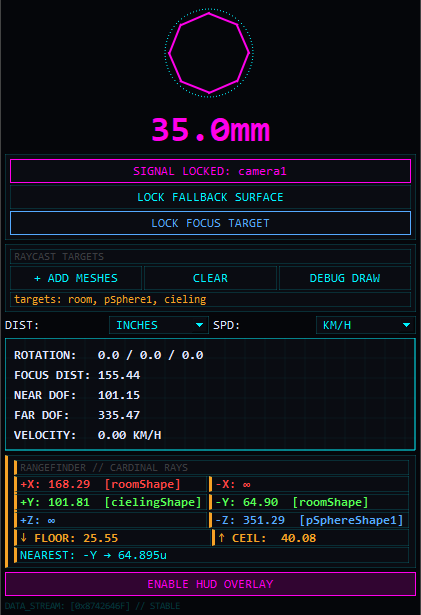
Displays the active camera's focal length. The iris diagram visually animates its aperture based on the focal length.
- 2ATTACH CAMERA SIGNAL
Select a camera in the Maya viewport and click this to lock it into the HUD. All calculations will be driven by this camera.
- 3LOCK FALLBACK SURFACE
Select a ground plane or mesh and click this. If the raycaster's downward (-Y) ray misses all geometry, it will mathematically calculate the distance to this surface instead.
- 4LOCK FOCUS TARGET
Locks focus tracking to a specific object. The distance to this object will be used for all Depth of Field (DoF) calculations.
- 5ADD MESHES
Limits the raycaster to only hit specific meshes you select, ignoring the rest of the scene. Highly recommended for performance.
- 6CLEAR
Clears the specific target list, reverting the raycaster to "scene-wide" mode where it evaluates all visible meshes.
- 7DEBUG DRAW
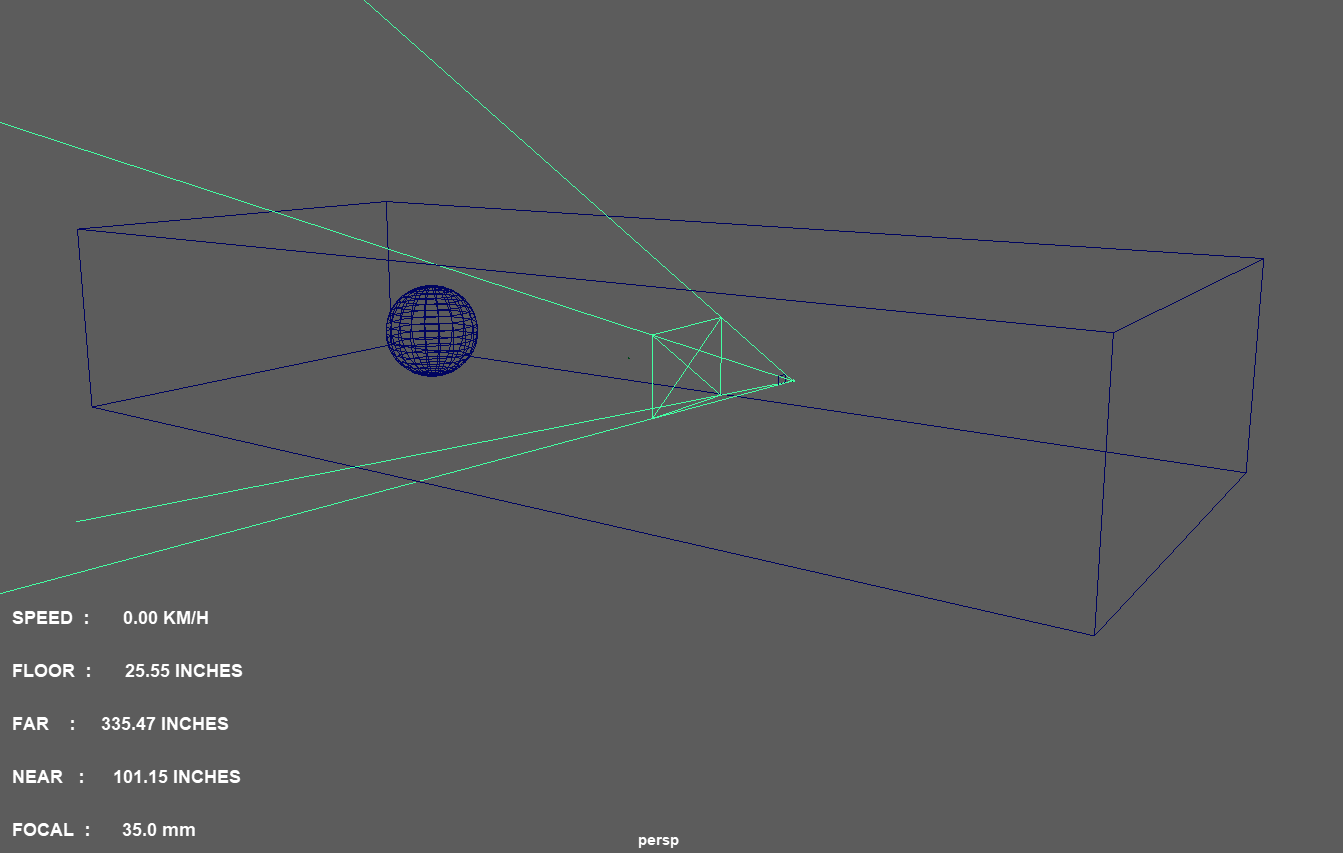
When enabled, physically draws the raycast lines in the Maya viewport. Green for hits, red for misses. Useful for diagnosing occlusion.
- 8Unit Selectors (DIST / SPD)
Change between Imperial and Metric units for distance and velocity readouts.
- 9Instrument Panel
Real-time readouts of Rotation, Focus Dist, Near DoF, Far DoF, and Velocity. DoF is calculated accurately using standard 35mm film circle-of-confusion and the camera's fStop.
- 10Rangefinder / Cardinal Rays
The raycaster fires 6 rays (+X, -X, +Y, -Y, +Z, -Z) from the camera. Displays the distance to impact and the name of the mesh hit. Highlights the shortest distance as NEAREST.
- 11ENABLE HUD OVERLAY
Adds non-intrusive text overlays directly onto your Maya viewport, showing Focal, Near, Far, Floor, and Speed in real-time while you work.
The entire tool is driven by a single locked camera. Select any camera and click ATTACH CAMERA SIGNAL. If the camera moves, the delta-tracker measures its velocity and triggers the raycaster.
Raycasting downward (-Y) is expensive if there is no floor. By locking a fallback surface, the tool can use simple math to find the floor distance if the ray misses, ensuring your "FLOOR" reading is always active.
If you lock a Focus Target, the FOCUS DIST becomes the exact distance from the camera to the target. If you don't lock a target, the tool falls back to using the distance measured by the forward (-Z) raycast!
By default, the OpenMaya 2.0 raycaster will evaluate every visible mesh in your scene. If you only care about walls and floors, select those specific meshes and click + ADD MESHES. This vastly improves performance.
The raycaster automatically ignores any geometry with _proxy or _bbox in its name, as well as intermediate objects and hidden geometry.
In V21, rays are only fired when the camera physically moves (position or rotation). If the camera is static, the raycaster sleeps and caches the last known distances, saving massive CPU cycles.
Near DoF and Far DoF are calculated using real optical formulas. It reads the camera's Focal Length and fStop, assumes a standard 35mm Circle of Confusion (0.03mm), and uses the FOCUS DIST to determine the exact planes where objects become blurry.
Calculates the exact speed the camera is traveling through the scene. Uses a 5-frame smoothing buffer to prevent jitter, and perfectly synchronizes to the scene FPS without using slow MEL evaluation.
Shows the distance to impact for all 6 cardinal directions (Up, Down, Left, Right, Forward, Back). Beside the distance, the name of the specific mesh that was struck is displayed in brackets.
The HUD constantly evaluates the 6 rays and prints the absolute shortest distance under NEAREST, warning you if the camera is about to clip through a wall or floor.